 Stationhand
Guides · Presenting
Voice tracking for radio, explained
How presenters record their links between songs ahead of time so a show sounds live – how it works, how to make it sound natural, and the mistakes that give it away.
Key points
- Voice tracking means recording the links between songs in advance. The automation slots them into the show, so it sounds live when it airs.
- It lets small stations have presenters at any hour – breakfast recorded the night before, a show voiced from the other side of the world.
- Good voice tracking is about timing: talking over the end of one song and into the start of the next, and finishing before the singing starts.
- Keep it timeless unless you know exactly when it airs – no "it's a sunny morning" in a show recorded on Tuesday night.
What voice tracking is
Voice tracking is recording a radio show's links – the bits where the presenter talks between songs – before the show goes out. The presenter sees the running order, records each link for its spot, and the automation plays the show with the links in place. To a listener, it sounds like a live show.
It isn't the same as a pre-recorded show. A pre-recorded show is one finished audio file; a voice-tracked show is built from the station's own music and adverts, with only the voice recorded – so songs, adverts and timings can still change right up to air.
Why stations use it
- Presenters at any hour. Breakfast, overnight or weekend shows don't need someone in the studio at that moment.
- Presenters from anywhere. A presenter can voice a show from home – or from another country.
- A better-sounding station. Links between songs make automation sound like radio rather than a playlist.
- More shows from the same people. An hour-long show can usually be voice tracked in fifteen to twenty minutes.
How a voice track fits between songs
A link usually does two jobs: it back-announces the song that's just played and talks up the one that's coming. The art is in where it sits:
- Over the outro. Starting to talk as the last song fades (once the singing has finished) keeps things moving – no gap, no dead air.
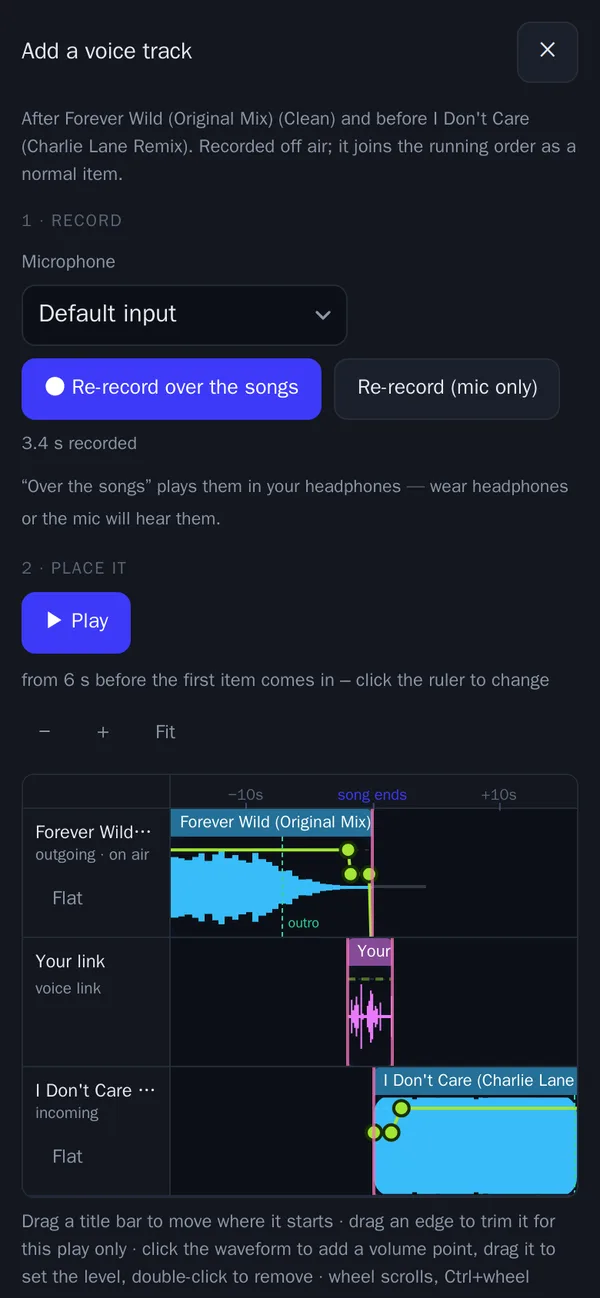
- Into the intro. Bringing the next song in under your voice, and finishing your last word just before its vocal starts, is called hitting the post. It's what makes a link sound slick.
- The music dips under you while you talk, then comes back up – automation does this for you.
Good voice tracking software shows you the end of one song and the start of the next while you record, and lets you nudge the link into place afterwards.
How to make it sound live
- Listen first. Hear the end of the song you're talking out of before you open your mouth, and talk with the energy of the music.
- Know your words, don't read them. Bullet points beat a script.
- Keep most links short. Ten to thirty seconds is plenty for most; save longer links for when you've something to say.
- Talk to one listener. "You", not "all you listeners out there".
- Be careful with time. Only mention the time, the weather or the news if you know exactly when the link will air – or keep it timeless.
- Wear headphones, so your microphone doesn't pick up the music.
- Mind your levels – speak at a steady distance from the microphone, and check a take before you save it.
Mistakes that give it away
- Talking over singing – starting before the last song's vocals end, or running into the next one's.
- Dead air – a gap between the song and your voice.
- Out-of-date references – "it's lovely and sunny" during a storm.
- A song changes after you've voiced it – your back-announce names a song that didn't play. Voice track as close to air as you can, and use software that warns you when a song next to your link is moved.
- Every link the same length and shape – vary them, as you would live.
Voice tracking in Stationhand
In Stationhand you voice track from any web browser – on a computer or a phone – for the hour playing now or any hour days ahead. Recording is guided by one big button:
- Play – the end of the song before plays in your headphones.
- Record – start talking whenever you're ready; the song keeps playing under you, dipped as it will be on air.
- Play next – bring the next song in under your voice.
- Stop – and your link lands on the timeline exactly where you spoke it.
While you talk, it counts down to the end of the singing and the end of the song, and – once the next song is in – to its vocal, so you can hit the post. Silence before your first word and after your last is trimmed off, and it tells you how long you talked over the outro and how close you came to the next vocal. If anything interrupts you before you've saved, the take is kept for you. More about presenting in Stationhand.
Questions
Quick answers
Can listeners tell a show is voice tracked?
Not if it's done well. Links that sit tightly between the songs, refer to the music and avoid time-sensitive details sound just like a live show.
How far ahead can I voice track a show?
As far ahead as the station has planned its schedule – often several days. Closer to air is better, so the songs around your links are less likely to change. In Stationhand an hour you've voice tracked is locked in, so rebuilding the schedule won't undo your work.
Can I voice track from my phone?
With Stationhand, yes – in the phone's web browser, with no app to install. Wear headphones and find a quiet room.
What does "hitting the post" mean?
Finishing your last word just as the vocals of the next song begin. It's the classic radio presenter's skill, and the countdown to the next vocal in Stationhand's voice tracking is there to help you do it.
How long should a voice-tracked link be?
Most are ten to thirty seconds. Back-announce, talk up the next song, maybe one line of personality – then get out of the way of the music.
Stationhand
Voice track your next show
Presenters record their links from any browser or a phone, for now or days ahead – and Stationhand slots them into the show.