 Stationhand
Guides · Choosing software
Radio automation software: a practical guide for small stations
What radio automation software does, the three ways to run it, and the questions worth asking before you choose – written for internet, community and hobby stations rather than big broadcasters.
Key points
- Radio automation software plays your station when nobody's in the studio – songs, jingles, adverts and links in the right order, at the right time, with smooth changes between them.
- It also does the paperwork: a schedule for every hour, a record of what played, and the figures your music licences ask for.
- It comes three ways: desktop software on one studio PC, software you run on your own server, or a hosted service. Each trades cost against effort and control.
- Choose on the boring things: what happens when a computer or the internet drops, how music gets in, how presenters work from home, and who looks after it.
What radio automation software does
At its simplest, radio automation software – also called automated radio broadcasting software or a radio playout system – is what plays your station: one item after another – songs, station IDs, jingles, adverts, news and the presenter's links – and makes the joins between them sound right. Around that it adds the jobs a station would otherwise do by hand: deciding which songs play when, keeping to the clock, and keeping a record.
Almost every station uses it in one of two ways, and most use both:
- Automation – the station runs by itself, overnight or all day, from a schedule built in advance.
- Live assist – a presenter is on air and the software does the heavy lifting: songs are lined up and timed, and the presenter decides when the next one plays.
For an internet station, the software usually also sends the sound to your stream – to an Icecast or SHOUTcast server, your own or a host's – along with the song titles listeners see in their player.
The jobs it should do for you
Feature lists are long and they all start to look the same. These are the jobs that make the difference day to day:
Music scheduling
Good scheduling stops your station sounding like a shuffled playlist. Look for clocks (a template for what each hour sounds like – a current hit, an older song, a jingle, adverts at :20), rules (no artist twice in an hour, no two slow songs back to back) and fair rotation, so every song gets its turn rather than the same 200 playing to death. The schedule should be built days ahead so you can check it, and be easy to change on the day.
Playout and the joins
The changes between songs are what listeners notice. At a minimum you want proper crossfades that know where each song really starts and ends – not a fixed 5-second fade over the last line of the lyrics. Better systems know each song's intro, outro and vocals, so links don't talk over singing; the best can mix songs on the beat like a DJ.
Voice tracking and live presenting
Most small stations rely on presenters who can't be in a studio at 7 am. Voice tracking lets them record the links between songs ahead of time, so the show sounds live. Our voice tracking guide explains how it works. If presenters go live from home, check how: an app on their own computer, a web browser, or a phone.
Adverts, jingles and the log
Even a hobby station has station IDs and the odd sponsor. You'll want adverts that land in the right break, jingles on instant-play buttons (a cart wall) and a log – the plan for each hour, and afterwards the record of what really played.
Reports for your music licences
UK stations playing music need licences from PPL and PRS for Music, and both ask for reports – listener hours, tracks per hour, and what was played. If your software can produce those figures for you, a quarterly chore becomes a two-minute job. The licences section of our start-up guide explains what's needed.
Staying on air
Ask what happens when things go wrong: a song file that won't play, a computer that restarts, an internet connection that drops. Look for silence detection, a backup feed or fallback audio, and automatic reconnection to your stream server. "It's never gone down" isn't an answer; "here's what it does when it does" is.
Three ways to run it
Radio automation comes in three shapes. None is best for everyone – it depends on your budget, how hands-on you want to be, and where your music lives.
| Type | Where it runs | Good for | Watch out for |
|---|---|---|---|
| Desktop software | A Windows PC (or Mac) at the studio | One studio, presenters on site, a one-off price | The station stops if that PC does; remote presenting is often an add-on |
| Self-hosted | Your own server – at home, in an office or rented | Control, low running costs, many presenters working remotely | Someone has to look after the server, updates and backups |
| Hosted (cloud) | The provider's servers; you use a browser | Nothing to install or maintain | A monthly fee that grows with storage and listeners; your music lives on their system |
Hosted systems are usually sold as cloud radio automation software or a cloud radio playout system: you run the station from a web browser and the provider keeps the computers running. Some desktop and self-hosted systems now work from a browser too, so "cloud" in a product's description doesn't always tell you where your station actually runs – ask.
There are also free and open-source options in all three shapes. They can be excellent, but "free" usually means you supply the time: setting it up, keeping it running and finding answers yourself.
How to choose: questions to ask
Before you commit, put these to any supplier – including us:
- What does it cost over three years? Include the licence or subscription, any per-presenter or per-listener charges, hosting, and paid add-ons.
- Who looks after it? Who installs updates, and what happens when something breaks at 2 am?
- What happens if the computer or the internet fails? Does the stream go silent, play fallback audio, or carry on?
- How does music get in? Uploading thousands of songs one by one is a week of your life. Can it read the folders you already have? Does it fix titles and check loudness?
- How do presenters work? From the studio only, from home with an app, from any browser, from a phone? Can they voice track?
- Can it produce your music licence reports?
- Can you try it first – a real trial, or a live demo you can poke around in?
- Can you leave? Your music, schedules and logs should be yours to take with you.
Tip: listen before you look. Ask to hear a station running on the software overnight – that's when automation is on its own, and when weak joins, repeats and dead air show up.
Common mistakes
- Choosing on the feature list. Two systems can tick the same boxes and sound completely different. Listen.
- Forgetting the running costs. A cheap monthly plan can cost more than a one-off licence within two years.
- Neglecting the music library. Wrong titles, missing artists and songs at different volumes make any software sound amateur. Budget a weekend for tidying.
- One computer, no backup. If the station lives on a single PC, have a plan for the day it fails.
- Ignoring the licences. Automation makes it easy to stream; it doesn't make it legal. Sort PPL and PRS for Music before launch.
Where Stationhand fits
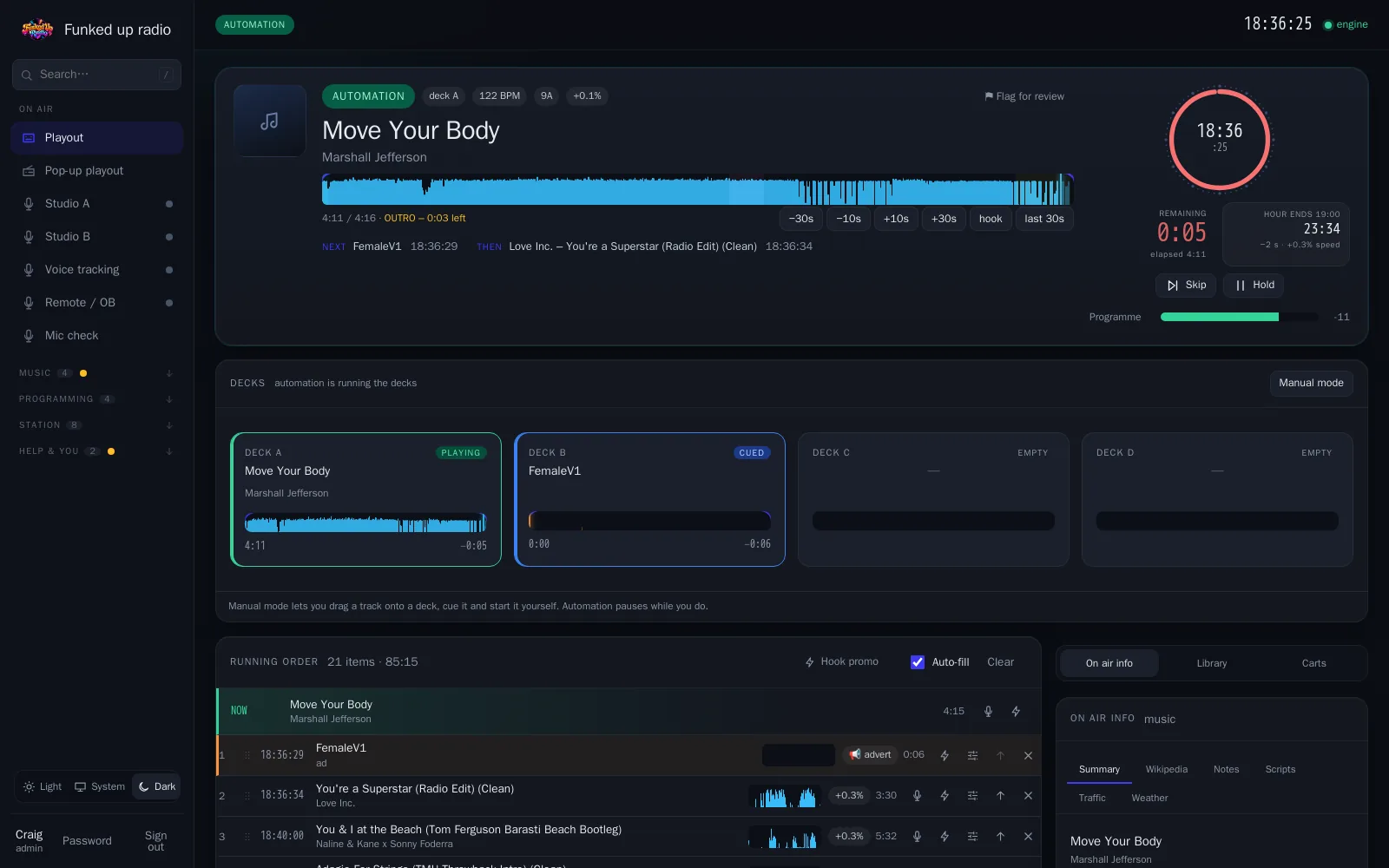
Stationhand is radio automation software for smaller and internet radio stations. It runs on your own computer – a Linux server, a Windows PC or a Mac – or as a hosted radio station on our servers (by invitation during the beta). It costs £20 a month on your own computer or £35 a month hosted with us, with the stream included either way (pricing). It plays your station around the clock with DJ-style beat-matched mixing and AI voice links, lets presenters go live or voice track from any browser or a phone, schedules your music and adverts, produces your PPL and PRS figures, and gives listeners a station website, web player and app. See all the features.
To be straight with you: it's newer and smaller than the long-established systems, and it's built by one radio-loving IT person rather than a big company (here's the story). If round-the-clock support is your top priority, a bigger supplier may suit you better. If you want a station that sounds great on a small budget, have a listen.
Questions
Quick answers
Is free radio automation software good enough?
It can be. Free and open-source systems run plenty of stations well. The cost is time: setting it up, keeping it updated and solving problems yourself. If you enjoy that, it's a great option; if you'd rather spend the time on your shows, paid software or a hosted service may be cheaper in the end.
Do I need a server to run radio automation?
Not necessarily. Desktop software runs on an ordinary PC, and hosted services need nothing but a browser. A server – even a small one at home – is worth it if presenters work remotely or you want the station to keep playing whatever happens to the studio PC.
What's the difference between automation and live assist?
In automation the station runs itself from a schedule. In live assist a presenter is on air: the software lines up and times the songs, but the presenter decides when each one plays and talks between them. Most stations use both – live shows by day, automation overnight.
Can an automated station sound live?
Yes, if the joins are good and there are links between the songs. Voice tracking – presenters recording their links in advance – is the usual way. Some systems, Stationhand included, can also add AI-voiced links, checked and approved before they air.
What is cloud radio automation?
Radio automation that you run from a web browser while the station itself plays on a provider's servers – nothing to install and no studio PC to keep switched on. It's also called hosted radio or radio station cloud hosting. The trade-offs are a monthly fee and your music living on someone else's system.
Does radio automation software stream to listeners?
Many systems send their sound straight to a stream server such as Icecast or SHOUTcast, with the song titles. Some include the stream, a website and a player; others expect you to rent streaming separately. Check which before you compare prices.
Stationhand
Hear it before you decide
Two stations run on Stationhand around the clock – press listen, or sign in to a real one with the live demo.